
More Than 250 ClickFix Domains Hide macOS Malware Behind Browser Fingerprinting
A broad campaign uses browser fingerprinting on over 250 domains to secretly deliver macOS malware only to intended targets, evading detection by security scanners.
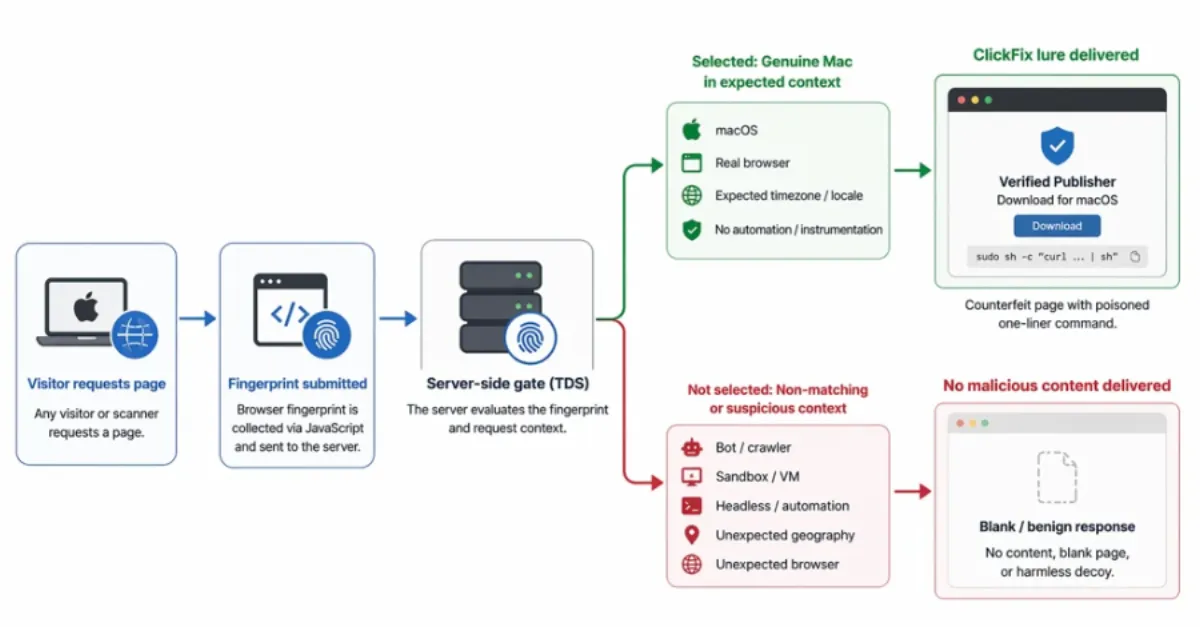
A widespread malware operation is using a network of more than 250 deceptive websites to distribute macOS-targeting malware, while actively hiding its payloads from security researchers and automated scanners. The campaign, dubbed ClickFix by investigators, relies on browser fingerprinting — a technique that quietly collects details about a visitor’s browser, operating system, screen resolution, installed fonts, and other characteristics — to determine if the visitor is a real human likely to be a macOS user in the desired region. Only when the fingerprint matches specific criteria does the site serve a malicious download, such as a fake software update or utility tool. To everyone else, including search engine crawlers and security sandboxes, the page shows benign content or nothing at all.
This cloaking method makes the malicious domains especially dangerous because they can remain undetected for longer periods. Website owners and hosting administrators might unknowingly be serving pages that redirect visitors to these compromised domains, or they could find their own sites impersonated as part of the lure. The malware distributed in this campaign is designed to steal sensitive information, install backdoors, or deploy additional payloads. Because the attack is triggered only under precise conditions, it bypasses many traditional security filters that scan sites rapidly without executing client-side fingerprinting scripts.
For everyday Mac users, the primary risk comes from encountering these lures through seemingly legitimate channels — such as malvertising, phishing emails, or compromised legitimate websites that redirect to the ClickFix domains. Once a user lands on the page, the browser fingerprinting script executes instantly, and if the device fits the target profile, the download starts automatically or is presented as a necessary update. The downloaded file often appears harmless, using familiar icons and names, but it contains malicious code that can evade macOS built-in protections, especially if the user is tricked into granting permissions.
To help reduce exposure to such threats, combining careful browsing habits with technical safeguards is essential. For an added layer of protection, using a secure DNS service like AEU DNS can automatically block access to known malicious domains, helping you avoid clicking through to dangerous sites in the first place. Since browser fingerprinting relies on reaching the malicious domain, preventing that connection entirely is one of the most effective defenses.
The ClickFix campaign underscores how attackers are continuously refining their evasion techniques. By employing browser fingerprinting at scale, they manage to fly under the radar for extended periods, maximizing the number of successful infections before the infrastructure is taken down. Both individual users and organizations running websites should stay alert and adopt proactive security measures that block threats at the network level and keep all software rigorously updated.
How to Protect Yourself
- Use a private, security-focused DNS service on your devices and router that filters out known dangerous websites — this stops you from even loading them.
- Always keep your Mac’s operating system and your web browser updated to the latest version, as updates fix security holes that malware often exploits.
- Never download software from pop-up windows or unfamiliar sites, especially if they claim you need an urgent update or a special player.
- Install a reputable antivirus or anti-malware program from a trustworthy vendor on your Mac and keep it running and updated.
- Be suspicious of unexpected emails, messages, or ads that prompt you to click a link or open an attachment — if something seems too good to be true or overly alarming, verify it through a separate channel.
- Regularly back up your important files to an external drive or cloud service so you can recover them if malware encrypts or damages your data.