
Mac Malware Operators Use Browser Fingerprinting on 250+ ClickFix Sites to Evade Detection
Researchers have found more than 250 malicious domains using a scareware tactic called ClickFix and browser fingerprinting to deliver macOS malware while avoiding security scans.
Security researchers have uncovered a widespread campaign involving over 250 malicious domains that exploit a technique known as ClickFix to distribute macOS malware. ClickFix is a form of social engineering where users are shown fake error messages or alerts that instruct them to copy and paste commands into their terminal, ultimately executing malicious code. By hosting these lures on hundreds of domains, the attackers increase their reach and make takedown efforts more difficult.
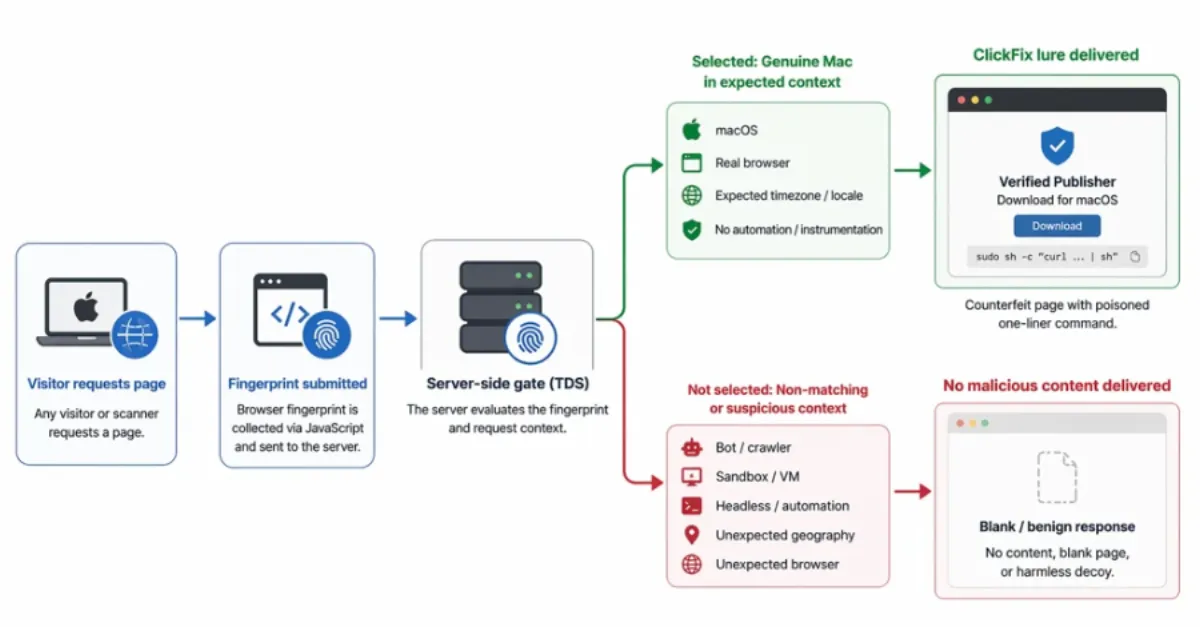
The domains employ browser fingerprinting to conceal the malware from security scanners and researchers. Browser fingerprinting collects detailed information about a visitor's browser and system—such as screen resolution, installed fonts, and user agent—to create a unique identifier. The malicious sites analyze this data to differentiate ordinary users from automated crawlers or security tools. If the visitor appears to be a genuine macOS user, the site delivers the ClickFix prompt; otherwise, it may show benign content or nothing at all, effectively hiding the threat from analysis.
For website owners and hosting providers, this campaign highlights the ongoing risk of phishing and malware distribution via compromised or fraudulent domains. Attackers often hijack poorly secured websites or register lookalike domains to host their malicious pages, which can damage the reputation of legitimate businesses and erode user trust. IT teams should monitor for unusual redirects, unexpected pop-ups, or unfamiliar domains associated with their brand, as these could indicate that a ClickFix page is impersonating their site.
To defend against such threats, using a secure DNS service like AEU DNS can provide an additional layer of protection by blocking access to known malicious domains before a connection is ever established. Combined with proactive hosting security measures, website owners can reduce the chance of their own sites being used in these schemes and help protect their visitors from harm.
How to Protect Yourself
- If a website shows an alert that says you need to copy and paste a command into your computer's terminal, do not do it—close the site immediately.
- Always keep your computer's operating system and web browser up to date, because updates often include fixes that can block these attacks.
- Use a trustworthy security software or browser extension that can stop you from accidentally visiting harmful websites or downloading dangerous programs.
- Be extra careful with links you receive in emails, messages, or on social media, especially if they come from someone you don't know or look suspicious.
- Consider switching your internet settings to use a secure DNS service, which can help block known scam websites before they even load.