
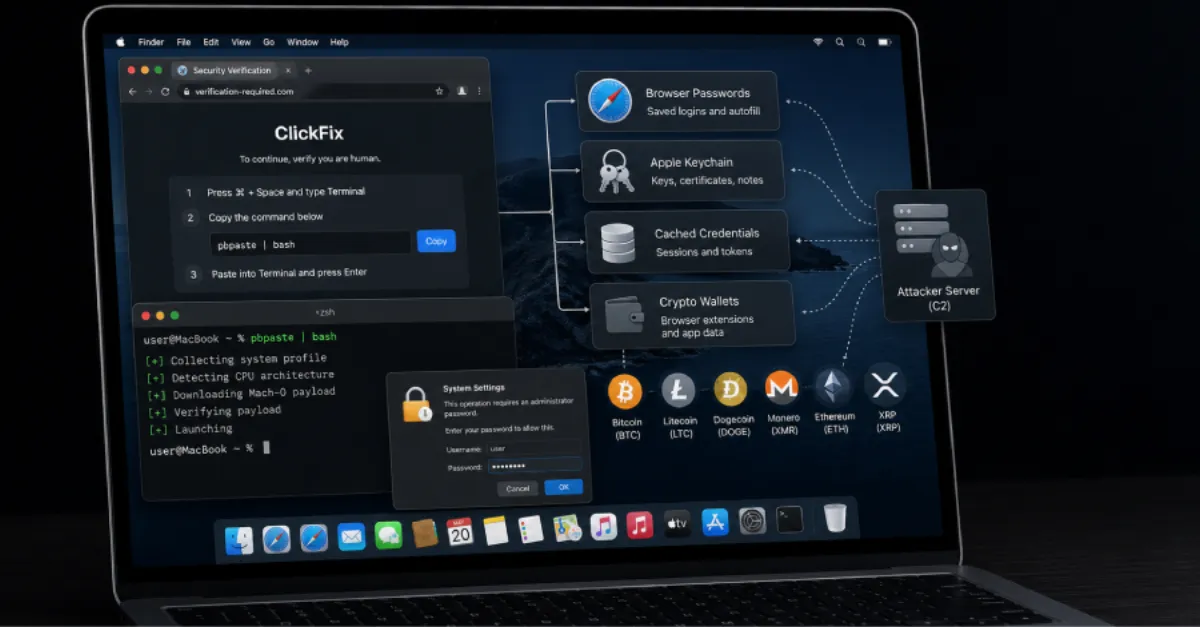
MacOS Users Targeted by ClickFix Attacks Delivering Crypto-Stealing Malware
A new wave of social engineering tricks macOS users into running harmful commands, resulting in malware that can empty cryptocurrency wallets.
A cybersecurity threat is making the rounds, targeting Mac users with a devious technique known as ClickFix. This scheme tricks people into copying and pasting malicious commands, often disguised as harmless fixes or updates, ultimately installing malware that can steal sensitive data, including the contents of cryptocurrency wallets. The attack is a stark reminder that no platform is immune to clever social engineering.
ClickFix attacks rely on a simple but effective human action: the copy-paste. Typically, a victim encounters a pop-up, a fake error message, or a compromised website that instructs them to copy a snippet of code and paste it into their terminal, a command-line interface on macOS. The message may claim this action is necessary to fix a problem, verify identity, or install a security patch. In reality, the pasted command executes a hidden script that downloads a malicious payload, granting attackers access to the system.
The malware delivered in this campaign is a stealer, a type of program designed to search for and exfiltrate valuable information. In this case, it specifically targets cryptocurrency wallets stored on the victim’s Mac. These wallets hold the keys to digital currencies, and once the stealer obtains them, attackers can drain the funds in minutes. Because cryptocurrency transactions are irreversible and largely anonymous, victims have little recourse after a theft.
MacOS has long enjoyed a reputation for being more secure than other operating systems, but that perception is changing. As Apple’s market share grows, so does the incentive for cybercriminals to develop malware for it. ClickFix attacks are particularly dangerous because they bypass many traditional security measures by simply convincing the user to do the harmful work. No software vulnerability is needed; the attack relies purely on trickery.
To avoid falling prey to such schemes, it is essential to treat any unsolicited prompt to copy and paste commands with extreme skepticism. Legitimate companies will never ask you to run obscure code in your terminal. By keeping your operating system and all applications up to date, you reduce the risk of being led to malicious sites in the first place. For an additional layer of defense, consider using a secure DNS service like AEU DNS, which can block connections to known malicious domains associated with these fake update pages and command-and-control servers.
The steady rise in Mac-focused malware underscores the need for constant vigilance, especially for anyone managing digital assets. Simple habits like double-checking web addresses, avoiding suspicious links, and never blindly following copy-paste instructions can make the difference between staying safe and losing everything.
How to Protect Yourself
- Be very suspicious of any pop-up or message that asks you to copy and paste a command; only do so if you are absolutely certain it is from a trusted source.
- Install apps only from the Mac App Store or directly from the developer’s official website.
- Turn on automatic updates for your Mac and all your software to patch security gaps quickly.
- If you hold cryptocurrency, store it offline in a hardware wallet, which is not connected to the internet and cannot be drained remotely.
- Use a security software or secure DNS service that can block known malicious websites and stolen credentials.