
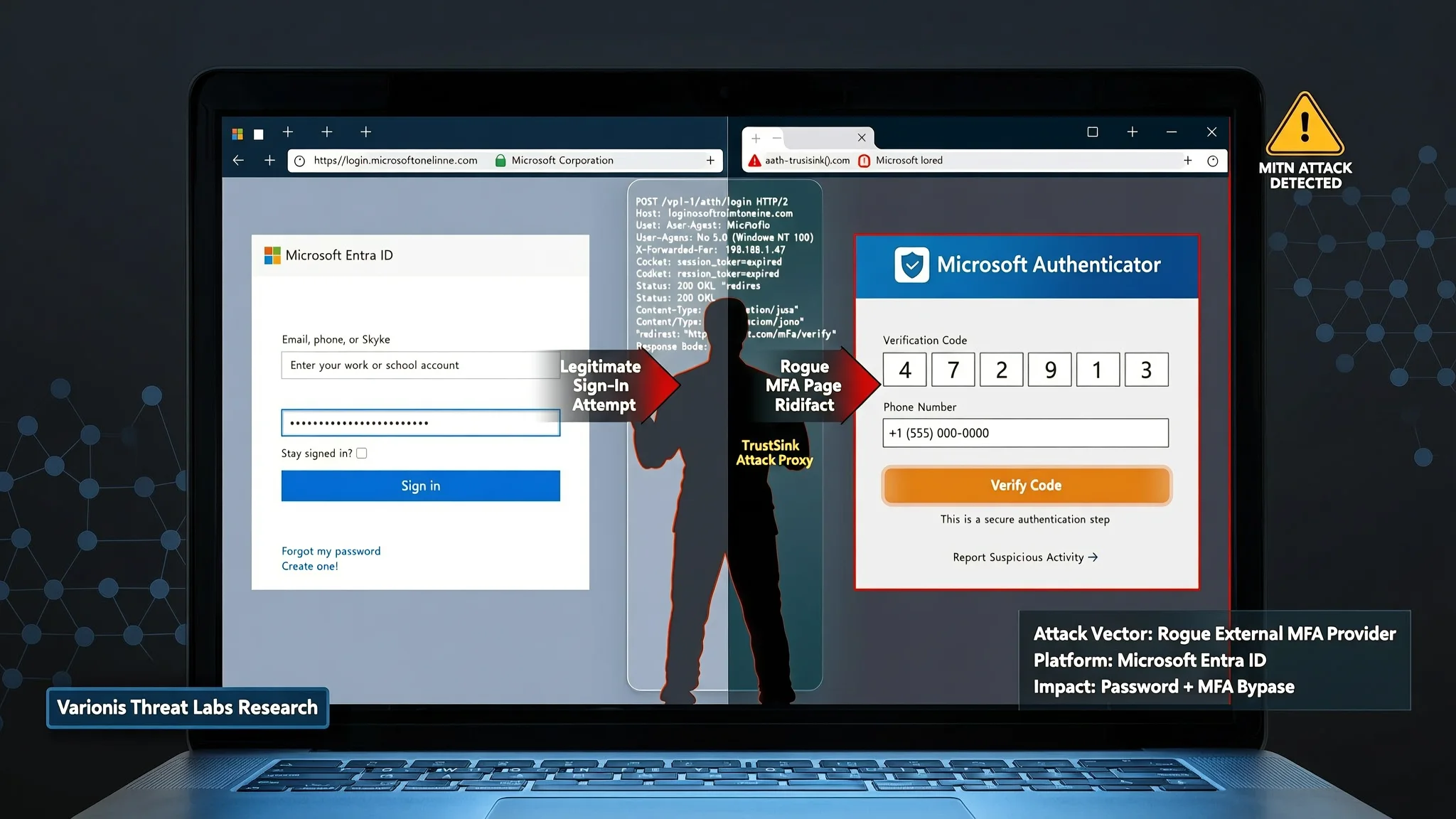
TrustSink Attack Uses Fake MFA Page to Steal Passwords
Varonis Threat Labs built TrustSink, an attack that uses a rogue external MFA provider in Microsoft Entra to capture passwords during real sign-ins.
Security researchers at Varonis Threat Labs have documented an attack called TrustSink that registers a rogue external multifactor authentication (MFA) provider inside Microsoft Entra, then uses a convincing fake password page to collect users' credentials during otherwise normal sign-ins. The technique was published on September 22, 2026, and the researchers say it can work with any provider that relies on this external authentication model, though they demonstrated it using Microsoft Entra ID, the cloud directory and sign-in service that many businesses use for Microsoft 365 and other applications.
Microsoft Entra supports external MFA providers, which let organizations use a third-party authentication service to handle the extra login step after a password. In a normal flow, a user first enters a username or email address and a password. If the account requires MFA, Entra can redirect the browser to the external provider to complete the second factor. When that provider sends back a valid signed token, a small digital proof that the second step finished, Entra treats the MFA requirement as satisfied and lets the user continue.
Varonis found that an attacker who has already taken over a highly privileged Entra account can register a rogue External Authentication Method (EAM), which is the configuration that points Entra to a specific external MFA provider. Setting up the malicious method requires changing the Authentication Methods Policy, the rule that decides which sign-in steps are allowed, and creating an application identity, a service principal, and a consent grant. A service principal is an application identity in a cloud directory that can be assigned permissions. Those actions require Global Administrator or Authentication Policy Administrator rights, so TrustSink is a post-compromise technique and not an initial-access attack.
During the proof-of-concept attack, the login starts normally: the victim types an email address and password on Microsoft's legitimate login.microsoftonline.com page. When MFA is triggered, Entra redirects the browser to the attacker's external provider for the second authentication step. Instead of showing a legitimate second-factor challenge, the malicious provider displays a copy of Microsoft's password prompt. The fake page uses the same fonts, layout, and button design as the real Microsoft login page and appears immediately after the victim has entered a real password on Microsoft's own domain. If the victim enters the password again, believing Microsoft is asking for it as part of the authentication process, the credential is sent to an attacker-controlled server in plaintext.
The rogue provider then generates a signed token stating that the MFA prompt was completed and returns it to Entra. The user is allowed into the application they originally wanted, and from the victim's point of view the sign-in appears to have completed normally. In Varonis's test tenant, every sign-in completed normally while their server received passwords with timestamps and source IP addresses. The researchers note that resetting a captured password did not remove the rogue provider from the authentication path; because the malicious method remains registered in the tenant's Authentication Methods Policy, it captured the replacement password at the user's next sign-in. Administrators should therefore remove the suspicious external MFA provider before rotating affected credentials.
TrustSink builds on earlier research by security researcher Dirk-Jan Mollema, who presented at x33fcon 2025 in a talk titled "Bringing Your Own Identity in Entra ID." Mollema showed how a rogue registered external MFA provider could satisfy an MFA requirement by returning a signed JSON Web Token (JWT) claiming authentication had succeeded without actually performing the expected check. TrustSink abuses that same path for credential theft. Because the fake password prompt appears when the user already expects another authentication step, the attack is especially convincing.
Varonis recommends removing any suspicious external MFA providers and their associated applications, keys, and redirect URIs before resetting affected users' passwords. Organizations should also monitor changes to the Authentication Methods Policy, limit standing Global Administrator and Authentication Policy Administrator privileges, and use phishing-resistant authentication methods such as FIDO2 security keys or Windows Hello for Business. The broader lesson for identity administrators is that any external service granted a trusted role in the login chain becomes part of the security boundary, and its configuration should be inventoried and reviewed. For businesses that run Microsoft Entra and need help reviewing these external authentication settings, AEU-I provides security-first IT and infrastructure consulting that can support an audit of identity and access configuration.
How to Protect Yourself
- If your company uses Microsoft sign-in and you see a second password box right after entering your password, stop and check the web address before typing anything else.
- Make sure the address bar still shows the legitimate Microsoft domain, login.microsoftonline.com, and not an unfamiliar website.
- Ask your company's IT staff to check whether any unexpected outside service has been added to handle the extra sign-in step for Microsoft accounts.
- If you are offered a physical security key, built-in device passkey, or Windows Hello, turn that option on instead of using codes or second passwords.
- If you think you entered your password on a fake page, tell your IT team first and do not change the password until they have removed the suspicious provider.
Terms Explained
- MFA Multifactor authentication, an extra sign-in step beyond a password, such as a code or security key.
- Microsoft Entra ID Microsoft's cloud directory that checks who is allowed to sign in to company apps.
- External Authentication Method (EAM) A setting in Microsoft Entra that lets an outside service handle the extra sign-in step.
- Authentication Methods Policy The rule in Microsoft Entra that decides which sign-in steps are allowed for users.
- Token A small digital proof issued after a login check that tells a system a step is complete.
- JSON Web Token (JWT) A signed digital ticket that carries claims about a user or login step.
- Service principal An application identity in a cloud directory that can be given permission to act on behalf of software.
- FIDO2 A sign-in standard that uses a physical security key or a built-in device passkey instead of a password.