
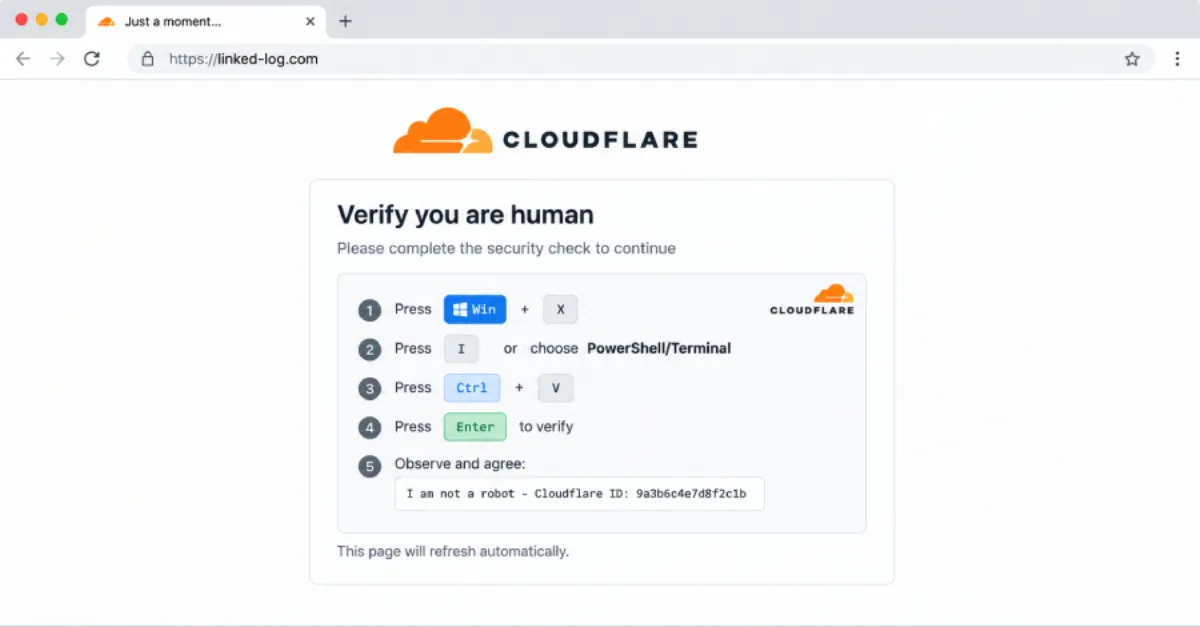
TerminalFix Attack: Fake Cloudflare Captcha Pages Plant Hidden Remote Access Tunnel
A new campaign called TerminalFix is tricking users with fake Cloudflare verification pages that secretly install a reverse-tunnel backdoor, giving attackers hidden control over infected devices.
A security report published by The Hacker News in August 2026 describes a new attack toolkit called TerminalFix that uses fake Cloudflare CAPTCHA pages to plant a dangerous reverse-tunnel backdoor on victims' computers. The tactic takes advantage of one of the most routine parts of modern web browsing: the challenge that asks visitors to prove they are not robots. Instead of a harmless checkbox, however, the fake page instructs users to run a hidden command, which quietly opens a secret connection from the infected machine to an attacker-controlled server.
At the start of an attack, a person lands on a website that has either been compromised or is operated by the attacker. The page displays a convincing imitation of a Cloudflare verification screen, with familiar colours, wording and layout. The visitor is told that to continue they must perform a simple step, such as opening the Windows Run dialog by pressing the Windows key and R, pasting a short snippet of text, and pressing Enter. In reality, that snippet is a script that downloads and runs the TerminalFix payload. Because the instructions look official and the user believes they are just proving they are human, many people obey without realizing they are handing control of their computer to a stranger.
After TerminalFix is installed, it creates what security professionals call a reverse-tunnel backdoor. A normal remote connection would require an attacker to reach into the victim's device, and that inbound traffic is usually blocked by a firewall or a home router. A reverse tunnel flips the direction: the infected computer makes an outbound connection to a server that the attacker controls. Since outbound connections are generally allowed, the tunnel slips past most network protections. The attacker can then send commands back through that open channel, giving them a hidden and persistent way to control the machine, steal files, install more malware, or move deeper into a network.
For website owners and IT teams, TerminalFix has two serious consequences. First, your own website could be hacked and turned into a distribution point for the fake CAPTCHA page, which would infect your visitors and damage your reputation. Second, an employee or administrator who falls for the trick on any device connected to your business can give attackers a foothold that may eventually reach your web hosting control panel, customer database, or internal systems. Because the reverse tunnel uses common protocols and looks like ordinary web traffic, it is difficult to spot using basic server logs alone.
Attackers choose the Cloudflare brand because millions of legitimate sites use it, so a verification prompt looks familiar and does not raise suspicion. The social engineering also creates a sense of urgency: users want to get past the interruption and see the page they originally tried to visit. This combination of a trusted brand and a small, seemingly harmless action is what makes the fake CAPTCHA technique so effective. The command that users paste may run in a Windows tool called PowerShell, which is designed to automate tasks but can also execute harmful scripts when a person is misled.
Defending against this campaign starts with a simple rule: a real CAPTCHA never asks you to open the Run dialog, paste a command, or download anything. Treat any such request as a red flag and close the page immediately. Keeping your operating system, browser and security software up to date closes many of the holes the malware tries to use. At the network level, secure DNS filtering can also prevent devices from ever reaching a known malicious domain that hosts the fake page. On the server side, website owners should choose a hosting provider that actively scans for unauthorized file changes and malicious scripts. AEU Hosting, for example, provides managed WordPress hosting with continuous security monitoring and hardening, which can help stop your site from being turned into a vehicle for fake verification pages and other web-based attacks.
How to Protect Yourself
- If a website asks you to press Windows key and R, paste something, or run a command to prove you are human, close the page immediately; real verification never works that way.
- Update your computer's operating system and web browser as soon as updates are available, because they fix security weaknesses that attacks like TerminalFix try to use.
- Keep a well-known antivirus or security program turned on and let it scan downloads and files in real time, so it can block malicious software before it runs.
- Before trusting a login or verification page, look at the website address in the top bar; if the name is unfamiliar or misspelled, leave the site.
- If you run a website, use a hosting provider that automatically scans for malicious files and use strong, unique passwords to keep attackers out.